💳Plans and billing
What Shippified costs today, what the Billing tab shows, and how the Free and Pro plans work if paid plans are switched on.
- Written for
- Anyone checking their plan, usage or subscription
- Applies to
- All plans
- Deprecated
- + Deprecated
Right now, Shippified is free for everyone, with no monthly order limit. Paid plans are switched off on shippified.net, so every workspace gets the full plan: unlimited orders from Discord bots, email and manual entry, and every feature, at no charge. You don't need a card, and nothing will be charged.
The Billing tab in Settings shows this, along with how many orders you've added this month. Open it from the sidebar: Settings, then the Billing tab. The page title is Plan & usage.
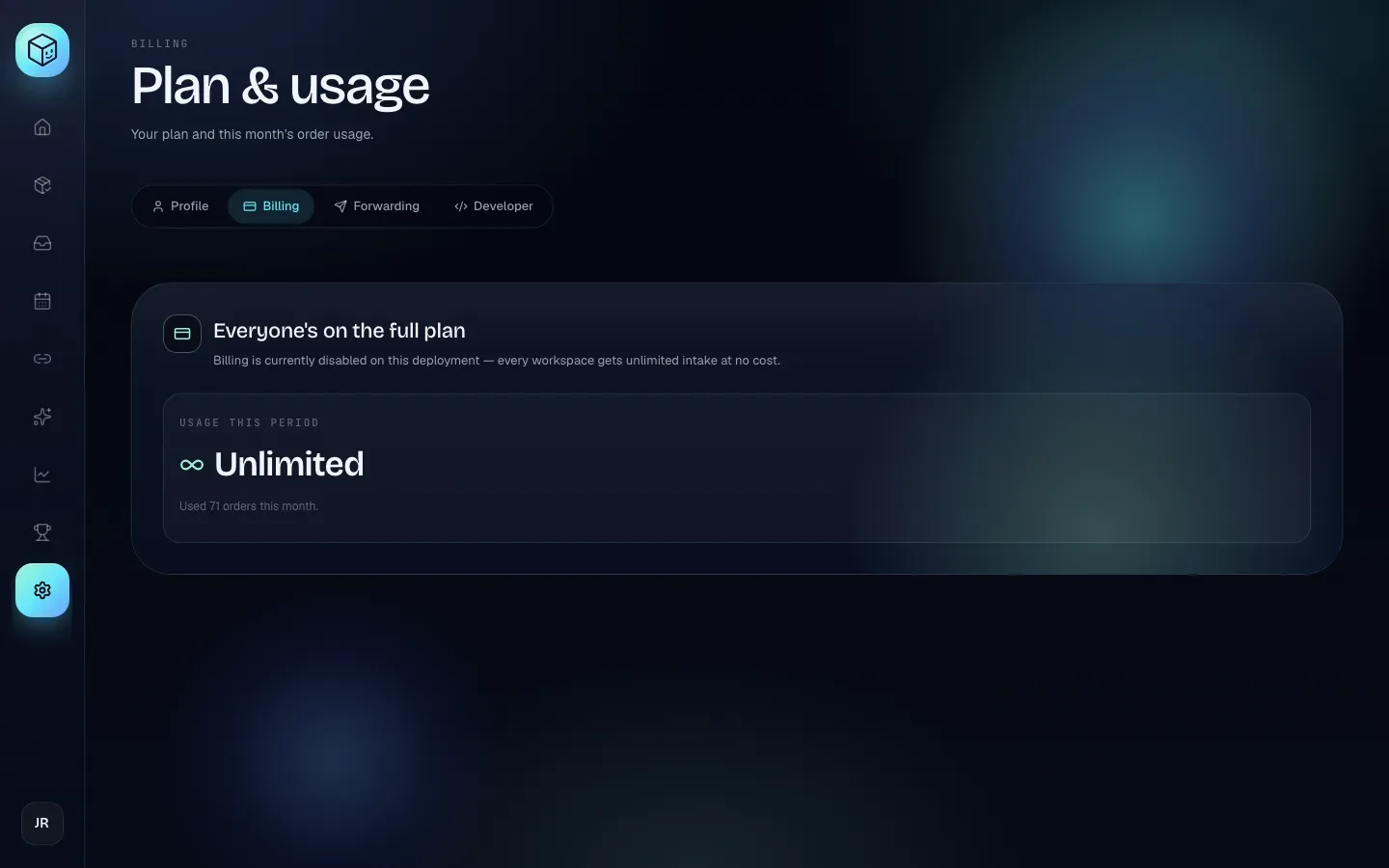
What the Billing tab shows today
The tab has one card, headed Everyone's on the full plan, with the line "Billing is currently disabled on this deployment — every workspace gets unlimited intake at no cost."
Part of the card | What it means |
|---|---|
Usage this period | Your intake allowance. It reads Unlimited. |
Used N orders this month. | How many new orders were added to your workspace since midnight on the 1st of this month, in the timezone set on Settings → Profile. It's for your information only; nothing happens at any number. |
There are no upgrade buttons, and no usage warnings appear anywhere in the dashboard.
If you paid for Pro before paid plans were switched off, a second card appears: Manage existing subscription ("You signed up for Pro before we flipped to free-for-everyone mode. Your existing card is still on file — manage or cancel here."). Its Open billing portal button takes you to Stripe, the payment company Shippified uses, where you can update your card, see receipts or cancel. See Manage or cancel a subscription.
The Verify your email. banner asks you to confirm you control your inbox. While paid plans are off, nothing depends on it, but a verified email is required before any upgrade if paid plans return.
If paid plans are switched on
Everything below describes how the Free and Pro plans are built into the app. None of it applies on shippified.net today. It's here so you know what to expect if paid plans are switched on in future. If that happens, the Billing tab will be headed Free plan or Pro plan instead of Everyone's on the full plan.
The two plans
Free | Pro | |
|---|---|---|
New orders per month | 100 | Unlimited |
Price | Free | $5 a month, or $50 a year |
Counter reset | Midnight on the 1st, in your timezone | Nothing to reset |
Everything else | All features | All features |
The plans would differ only in how many new orders can come in each month. Every other feature works the same on both. The yearly plan is labelled Save 17%: $50 a year instead of $60 for twelve monthly payments.
The Billing tab would show:
Free plan: "100 orders per month, then intake is blocked until the counter resets. Upgrade to Pro for unlimited." Usage this period shows your count out of 100 (for example 42 / 100), with a progress bar and "Counter resets date (your timezone)." Below it, an Upgrade to Pro card.
Pro plan: "Unlimited orders. Cancel anytime from the Stripe portal — your access stays until the end of the current billing period." Usage this period reads Unlimited, with a Renews (or Trial ends) date, and a Manage subscription card with Open billing portal and Refresh status.
What would count toward the Free limit
The count is new orders added since midnight on the 1st of the month, in the timezone set on Settings → Profile. Anything that creates an order counts; anything that updates one doesn't.
Counts | Doesn't count |
|---|---|
A Discord bot checkout that creates a new order | A shipping, delivery or delay email for an order you already have (matched by order number) |
An order email that creates a new order | A bot checkout merged into an existing order with the same order number |
An order you add with New order on the Orders page | Tracking refreshes from the carrier |
An order created when you import or rebuild from your mailbox | Editing an order, such as adding a sale price or cost |
Messages that aren't orders at all (newsletters, duplicates) never count. Because the reset follows your timezone, it's worth setting it correctly now; see Settings and your profile.
Warnings and what would happen at the limit
On the Free plan, a banner would appear across the dashboard at 80% of the allowance:
When | Banner | Button |
|---|---|---|
80–99 orders used | "N orders left this month. Resets date. Upgrade to Pro for unlimited." | Go Pro |
100 orders used | "Free plan limit reached. New webhook, email, and manual orders are paused until date. Upgrade to keep importing." | Upgrade |
At 100 new orders, Shippified would stop creating orders until the counter resets:
Discord monitor bots: the checkout isn't saved. The bot's activity log shows it as rejected with
plan_limit_reached (100/100).Email: the new-order email isn't saved, and shows as Rejected in your inbox activity with the same reason.
Adding an order by hand: the New order button on the Orders page becomes Limit reached and is disabled ("Free plan limit reached — upgrade to add more orders.").
API: creating an order fails with
Free plan limit reached — you've already added 100 of 100 orders this month. Upgrade to keep importing.
Updates to orders you already have, tracking refreshes, and everything else in the dashboard would keep working.
Under a limit, refused checkouts are not saved for later. A refused bot checkout would have to be added by hand after the reset or an upgrade. Refused emails can be brought back with Rebuild from your mailbox once there's room.
Upgrading to Pro
An upgrade needs a verified email address. Without one, it fails with "Verify your email before upgrading. Check your inbox for the link, or resend it from the banner on your dashboard." Use Resend on the Verify your email. banner to get a new link.
- Open the Billing tab
Click Settings, then Billing (or Go Pro / Upgrade on the usage banner).
- Pick monthly or yearly
Under Upgrade to Pro, click Upgrade monthly on the Monthly card ($5/mo, "Billed every month. Cancel any time.") or Upgrade yearly on the Yearly card ($50/yr, Save 17%, "12 months for the price of 10."). The card shows Redirecting….
- Pay on Stripe
Enter your card on Stripe's checkout page. Shippified never sees your card number.
- Come back to Shippified
Stripe returns you to Settings. The tab should show Pro plan and a Renews date. If it still says Free plan, wait a few seconds and reload; Stripe confirms payments in the background.
If you leave the Stripe page without paying, you're returned to Settings and nothing changes.
Manage or cancel a subscription
Subscriptions are managed in the Stripe Customer Portal, a Stripe page where you can update your card, change plan, see receipts and cancel. Today this only matters if you subscribed before paid plans were switched off.
- Open the portal
On the Billing tab, click Open billing portal (in Manage existing subscription today, or Manage subscription on a Pro plan). It shows Opening…, then takes you to Stripe.
- Make your changes
Update your card, download receipts, or cancel.
- Return to Shippified
Use the portal's link back. On a Pro plan, click Refresh status to load the latest details.
When you cancel, access you've paid for lasts until the end of the current billing period. Your orders and settings are kept either way.
Deleting your Shippified account also cancels an active Stripe subscription automatically, straight away rather than at the end of the period, so you aren't billed again. Download any receipts you need from the billing portal before you delete.
Troubleshooting
Do I need to add a card or upgrade?
No. Shippified is free with no order limit while the Billing tab says Everyone's on the full plan.
I'm still being charged for an old Pro subscription
Open Settings → Billing and use Open billing portal under Manage existing subscription to cancel it. If that card doesn't appear, contact [email protected] with the email on your receipt.
I see "Couldn't open the billing portal." or "Billing is not configured."
Shippified couldn't reach Stripe. Wait a minute and try again. If it keeps happening, contact [email protected].
A bot checkout says "rejected" in its activity log
With paid plans off, that's never because of a plan limit. Check the reason shown next to it; see Discord monitor bots and Troubleshooting.
The Billing tab says "Fetching plan + usage…" or "Couldn't load usage."
Reload the page. If it persists, sign out and back in.