Roadmap and Status spaces
Embed

<a href="https://forumulate.com/guides/roadmap-and-status"><img src="https://forumulate.com/guides/_api/public/orgs/046a9bc0-d530-43ae-9bae-af7945008cda/spaces/36aa4df0-1e95-4cef-8ae9-795169441345/pages/2a48cd77-d0f5-4c84-b4e7-a01a83a28301/social-card.svg?v=3e7ae33eec8b" alt="Roadmap and Status spaces" width="600" height="315"></a>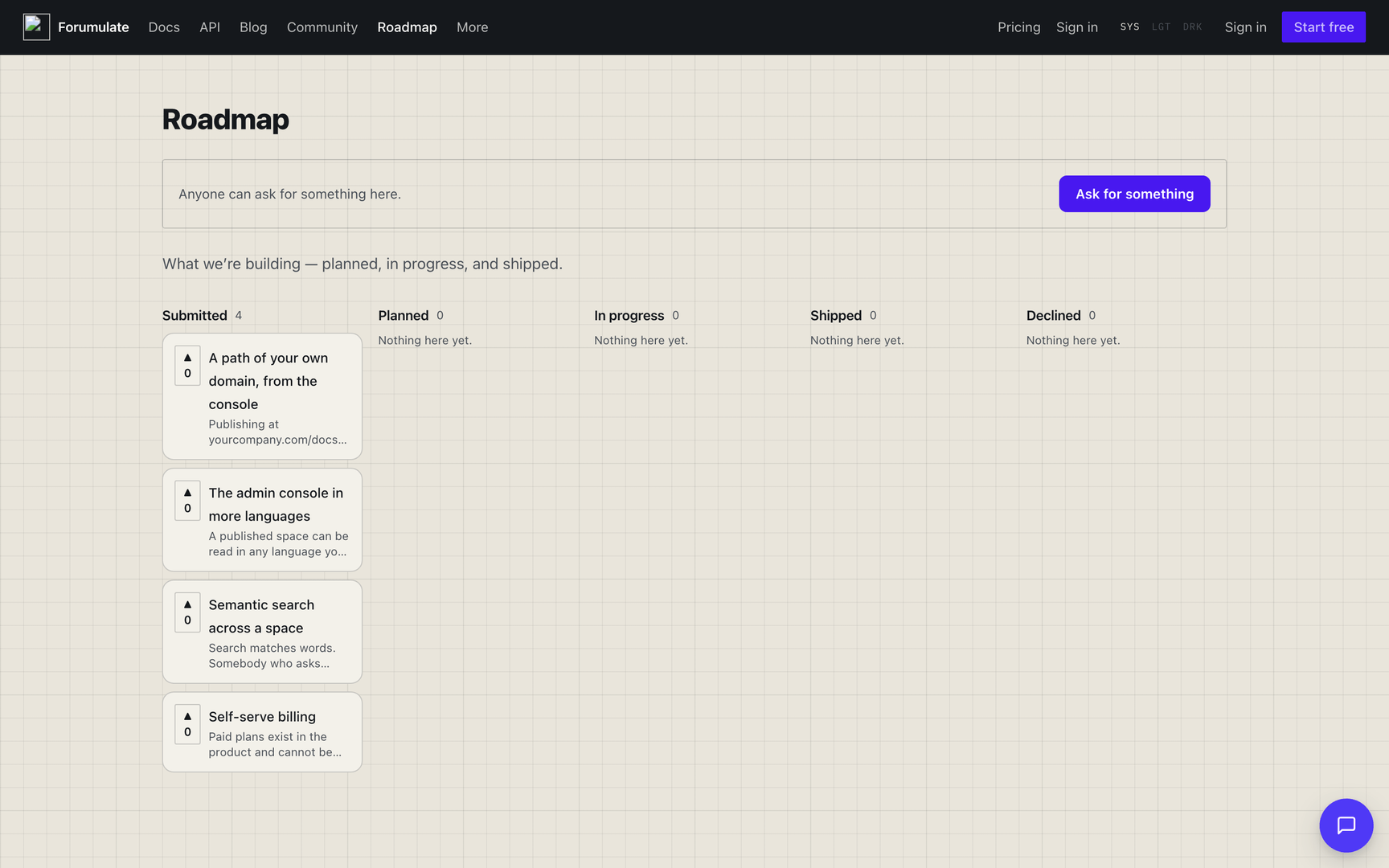
Two space types for telling people where the product is going and whether it is up right now: Roadmap (a voting board of what is planned) and Status (uptime, incidents and history).
Roadmap (ROADMAP)
What is planned, and what people want. Members suggest items, everyone votes, and the board arranges items by their status.
A summary of the type. The full guide, with every look, key, sub-page, outlet and setting, is Roadmap spaces.
Set it up
Create a space and choose the Roadmap type. Its public prefix is
/r/.Add items, or let members suggest them (the primary action reads "Suggest a feature").
Pick a preset (Board, List or Timeline) and a look (
default,paper,kanban,minimal,portal), and decide whether votes are anonymous.
The lanes (statuses)
The board's columns are statuses: Submitted, Planned, In progress, Shipped and Declined, plus up to ten of your own. You can rename, reorder, hide and close lanes, or make the lanes horizons ("Now", "Next", "Later") instead of statuses. Rename one per board on PATCH /orgs/{orgId}/spaces/{spaceId}/roadmap-settings/lanes/{laneKey}, or for the whole organization with the roadmap.statuses setting — a comma-separated list of lane names in lane order. A board that renamed a lane keeps its own word; one that never did inherits the organization's. The rest is in Roadmap spaces → Behaviour settings.
Front page
The roadmap's front page is a composed document. Until you edit it, it is generated: the intro band, then the submit and lanes bands in the order you set. A roadmap feed — say, "Recently shipped" on your blog's front page — sorts by latest or top and filters by lane and tags.
Around the board, every roadmap also has tag pages (/tag/<tag>), lane pages (/status/<status>), a standalone submit page (/new), RSS, Atom and JSON feeds, and a feedback widget (widget.js) — see Roadmap spaces.
Voting
Readers vote on items. Turn anonymous votes on to let logged-out readers vote without an account; otherwise votes come from signed-in members.
Both anonymous voting and who may post resolve the same way — the space's own setting first, then the organization default, then the shipped behaviour — but they are written to different doors, so the table names each one:
What | The organization default | The override for one space |
|---|---|---|
Anonymous votes |
|
|
Who may post |
|
|
…/roadmap-settings carries no whoCanPost field. Who may post is a community setting on every topic-backed type, so it lives on the one community door — the same one a forum and a blog use. See Community (Forum) spaces for the rest of the fields on it.
An organization that sets neither key gets today's behaviour: nothing changes until one of them is stated.
How an anonymous vote is counted — and what that can and cannot prevent
An anonymous vote is a demand signal, not an election, and it is worth knowing exactly what it is before you publish a board that runs on one.
How a voter is identified. The first anonymous vote sets a long-lived, httpOnly, first-party cookie on your domain. What is stored against the vote is a keyed hash of that value — never the raw cookie, never an IP address, and nothing that could be read back out. A browser that keeps cookies therefore gets exactly one vote per item, and can take it back by clicking again.
A caller with no cookie. A request that presents no cookie is identified by a keyed hash of its network address and user agent, and the cookie is then set to that same value. So the same client keeps one identity whether or not the cookie comes back, and a script cannot mint new voters by discarding it.
One consequence, deliberately accepted: a vote identified that way is add-only. Readers behind one office or one mobile carrier share a network address, so a repeat click must never be able to cancel somebody else's vote. The worst case is a second reader's first click not registering until they have their own cookie — which is better than a vote disappearing.
What this does not prevent. A determined caller with many network addresses, or many browser profiles, can still vote more than once. No cookie-based scheme can stop that, and we would rather say so than imply a precision the number does not have. Two things follow:
anonymousVotesis off by default, on every board, and stays off until you turn it on.If a board's numbers have to be defensible — a customer council, a paid-tier vote, anything that decides a budget — require sign-in instead. Turn anonymous votes off and set
whoCanPost/reader sign-in so each voter is an account. Member votes are per account and cannot be multiplied.
Related controls, both per board on PUT …/roadmap-settings: voteBudget caps how many items one voter may back at once (so a voter prioritises instead of voting for everything), and moderateSubmissions holds suggested items for review before they appear.
Per-item fields
Aiming for (
target) — a quarter, a month, or "not scheduled". Deliberately not a date.Size (
effort) — Small, Medium, Large, or Unknown.Theme (
theme) — the part of the product this belongs to, so a big board reads in groups.Tracked in (
trackingUrl) — the issue or ticket where the work happens.Progress (
progress) — percent done, 0–100, drawn as a bar on the card.Cover image (
coverUrl, withcoverAlt) — a picture across the top of the card.Owner (
owner, internal) — who is driving it. Staff-only; the public board shows the work, not the org chart.Impact score (
impact, internal) — your own prioritisation number. Votes are public; judgement is not.
The authored sections per item
The problem (required), What we are thinking (a direction, not a commitment), Updates (append dated lines as it moves), and How we will know it worked.
"Required" here is advisory, not a refusal. Publishing an item with an empty required section succeeds — a placeholder going up is a legitimate thing to do — and POST /orgs/{orgId}/spaces/{spaceId}/items/{itemId}/publish answers with a conformance block naming which declared slots are filled and which are missing, so a caller that has just published can tell a complete item from one with holes in it without fetching it again.
The item page and one item's own look
Every item page publishes Article structured data whose creativeWorkStatus is the item's lane under your board's label, with votes and comments as interaction counters and a board → item breadcrumb. Its layout (side rail, voters, history, the team's answer, related requests, cover, colours) is theme.roadmap.item, and a moderator can give one item its own CSS, theme keys, share image and JSON-LD under customization — both in Roadmap spaces.
Status page (STATUS)
Is it up? Uptime, incidents and history. You add monitors (URLs we check for you), and incidents are posted against them.
This is a summary. How the page looks and behaves — its looks, sub-pages (history, uptime, maintenance, components, incidents), the component state source, subscribers and embeds — is in Status pages; what each kind of monitor checks, and from where, is in Status monitors.
Set it up
Create a space and choose the Status page type. Its public prefix is
/st/.Add a monitor — a URL to check. Forumulate watches it and can post incidents for you.
Let readers subscribe (
status.subscribers).Set how much history to keep (
status.history_days).Optionally, set the uptime a day needs to read operational or partial (
status.day_thresholds, default99.9,99).
Daily bars and uptime
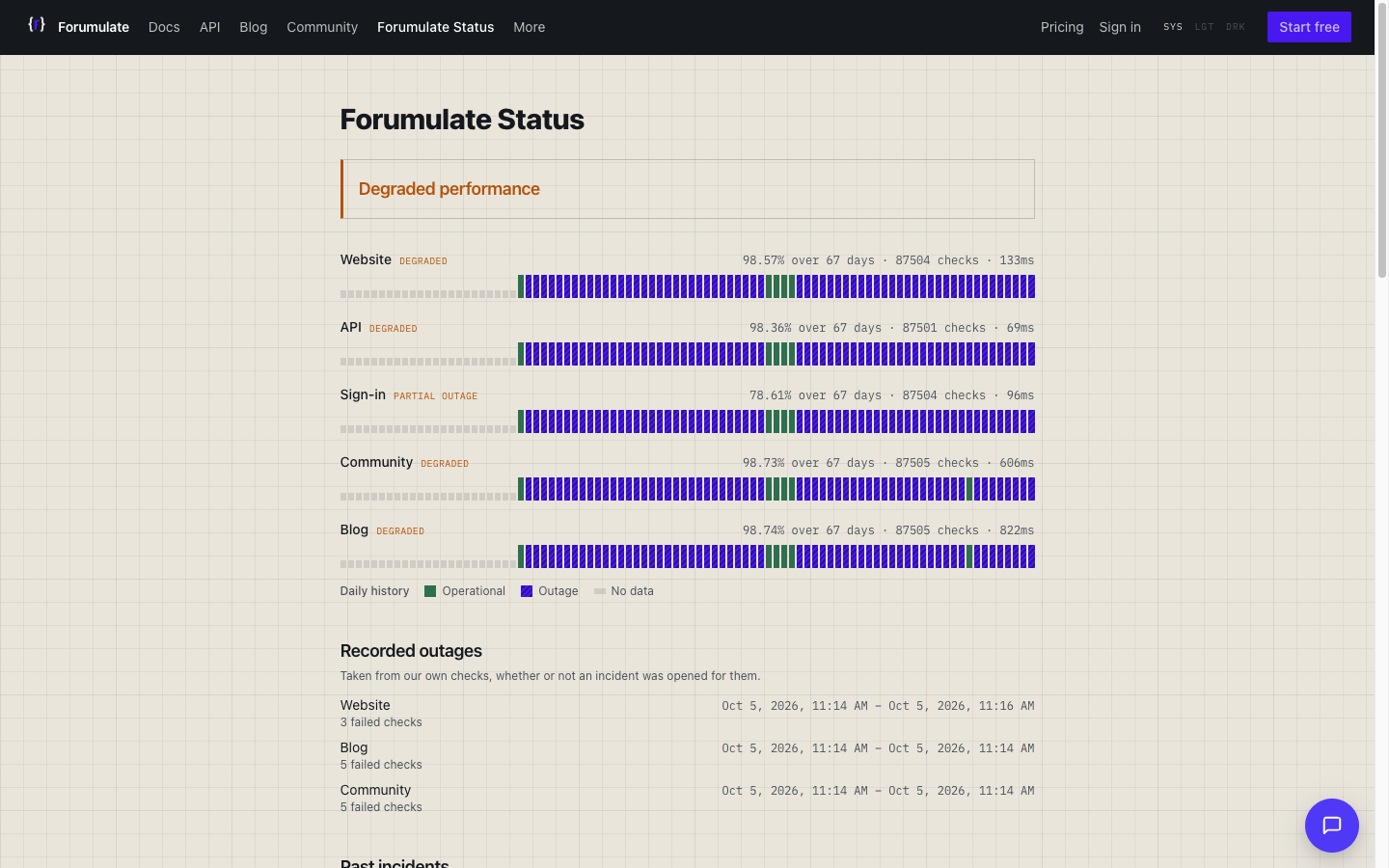
Each bar on a component's uptime strip is one day, coloured by that day's measured uptime (successful checks ÷ checks): operational at or above 99.9%, partial at or above 99%, outage below. A single failed check never moves a day off operational on its own. An incident linked to a component colours the days it spanned by its impact when that is worse. Change the floors for the whole organization with status.day_thresholds ("operational,partial", e.g. 99.5,98), or for one page with dayThresholds on PUT …/spaces/{spaceId}/status/settings (null returns it to the organization's floors). The percentage beside the strip is successful checks ÷ all checks over the window. Checks are recorded once per run, at each monitor's own interval.
There is no status.components setting, and there never was one: a status page's components are its monitors. You add a monitor and that is the component readers see, so there is nothing separate to configure. An incident's components field names which of them an incident affected.
Overall state
The page headline reflects the overall state, computed from your monitors and open incidents:
All systems operational (up)
Degraded performance (degraded)
Some systems are down (down)
Scheduled maintenance (maintenance)
Incidents
The type has a dedicated Incidents tab. Each incident carries:
Severity (
severity) — minor, major, critical, or maintenance.Where it stands (
state) — investigating, identified, monitoring, or resolved.Affected (
components) — which of your monitors were affected.Full write-up (
postmortemUrl) — a longer analysis published elsewhere.
And the authored sections: Impact (who could not do what, and when — required), Timeline (UTC timestamps in order — required), What caused it, and What we changed.
Reader extras
The public page shows current state on top and incident history beneath, plus a subscribe form so people are told when something breaks.
Front page
The status page's front page is a composed document. Until you edit it, it is generated: the intro, board and subscribe bands. A status page has no list to feed from, so a spaceFeed pointed at one renders nothing; put the board band where you want the state shown.
In the API
Every operation below is also reachable from the other surfaces without a dedicated command. forumulate api <Operation> calls it from the CLI, the JavaScript SDK has a typed method for each one (the last column names it; the Python and Go clients are generated from the same spec), and an agent reaches the organization-scoped ones through the MCP call_api tool. Where a CLI command or MCP tool exists too, the last column names it. Operation names link to the API reference.
Public Roadmap
Operation | Request | What it does | Shortcuts |
|---|---|---|---|
| Get the roadmap in a space (public reader) |
| |
| Your votes on a roadmap |
| |
| Get the search in a space (public reader roadmap) |
| |
| Read a roadmap item as markdown |
| |
| Read a roadmap item |
|
Public Roadmap Item
Operation | Request | What it does | Shortcuts |
|---|---|---|---|
| List voters in a space (public reader roadmap t) |
| |
| Create the react in a space (public reader roadmap t posts) |
| |
| List reactions in a space (roadmap t posts) |
|
Public Roadmap Lanes
Operation | Request | What it does | Shortcuts |
|---|---|---|---|
| List lanes in a space |
|
Public Roadmap Reach
Operation | Request | What it does | Shortcuts |
|---|---|---|---|
| RSS feed of the roadmap |
| |
| Atom feed of the roadmap |
| |
| JSON feed of the roadmap |
| |
| JSON feed of widget |
| |
| Get the widget JS in a space (roadmap) |
|
Public Roadmap Vote
Operation | Request | What it does | Shortcuts |
|---|---|---|---|
| Create the vote in a space (public reader roadmap t) |
|
Public Roadmap Write
Operation | Request | What it does | Shortcuts |
|---|---|---|---|
| Create an item in a space (public reader roadmap) |
| |
| Create the comment in a space (roadmap) |
| |
| Create the watch in a space (public reader roadmap t) |
| |
| Follow the topic |
| |
| Follow the roadmap |
| |
| Follow the roadmap (replace) |
| |
| Subscribe the roadmap |
|
Space Settings roadmap settings
Operation | Request | What it does | Shortcuts |
|---|---|---|---|
| List roadmap settings in a space |
| |
| Replace roadmap settings in a space |
| |
| Update the lane |
|