🪝Webhooks
Subscribe your own HTTPS endpoint to order, tracking and share events, verify each delivery's signature, and handle failures.
- Written for
- Developers receiving events from Shippified
- Applies to
- All plans
- Deprecated
- + Deprecated
Outbound webhooks send workspace events to an endpoint you control. Each delivery is a JSON POST signed with a secret only you and Shippified know. Use them to push new orders and shipping updates into your own systems, or into tools such as n8n or Zapier, instead of polling.
This page is about webhooks Shippified sends you. To send orders into Shippified with a Discord-format webhook, see Getting orders in.
Endpoints
Method | Path | Purpose |
|---|---|---|
|
| List subscriptions, newest first (paginated). |
|
| Get one subscription. |
|
| Create a subscription. Returns the signing secret once. |
|
| Change |
|
| Delete a subscription. |
|
| Send a test event now and return the result. |
|
| Issue a new secret, reset failures and reactivate. Returns the secret once. |
Event types
Event | Fires when |
|
|---|---|---|
| A new order is created from any source: Discord, email or |
|
| A message or manual create matches an existing order's number and is merged into it. |
|
|
|
|
| A shipping message arrives for an order not yet shipped, a |
|
| A delivery message arrives for an order not yet delivered, or a carrier lookup first confirms delivery. |
|
| A live carrier lookup returns data, from the background tracker or an API call. Cached answers don't fire it. |
|
| A share card is created. |
|
orderis the full order object after the change.sourceis the channel:discord,emailormanual.patchlists the fields thePATCHapplied, plusstatuswhen a tracking number moved the order to shipped, and the updateduserEdited. A cleared sale price appears as"salePriceCents": null.carrieris a carrier key:ups,fedex,usps,dhlordhl-express.deliveredis a boolean;eventCountthe number of carrier scans.
One message can produce several events: a shipping email for a known order fires order.merged and then order.shipped. Repeated tracking lookups don't repeat order.shipped or order.delivered; they fire only on a real status change.
These never fire events: mailbox rebuilds and other history backfills, POST /api/orders/reparse and DELETE /api/orders/:id.
Create a subscription
You can do this in the dashboard or through the API.
- Dashboard
- curl
- TypeScript SDK
- MCP
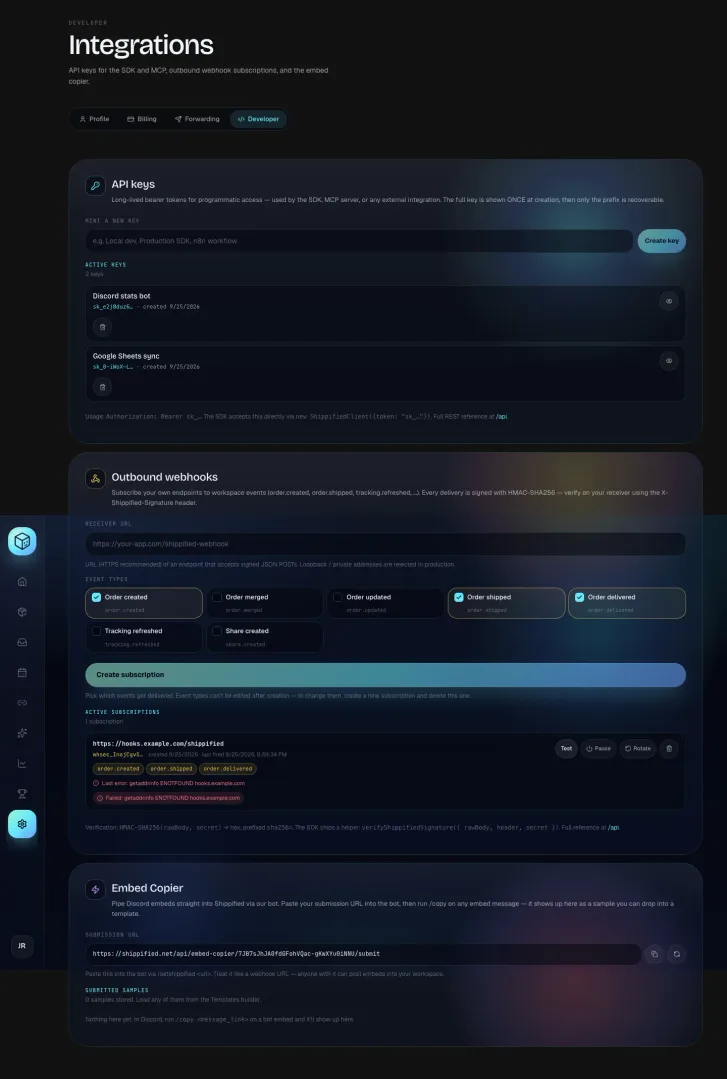
- Open the Developer tab
Go to Settings → Developer and scroll to Outbound webhooks.
- Enter your endpoint
Type your endpoint's URL into Receiver URL, for example
https://hooks.example.com/shippified. - Pick events
Under Event types, tick the events you want. Order created, Order shipped and Order delivered are ticked by default. The dashboard can't change them after creation; use
PATCH(see Pause, resume and edit) or create a new subscription. - Create it and save the secret
Click Create subscription. The signing secret (
whsec_…) is shown once: copy it into your receiver's configuration before leaving the page.
curl -s -X POST https://shippified.net/api/webhook-subscriptions \
  -H "Authorization: Bearer $SHIPPIFIED_API_KEY" \
  -H "Content-Type: application/json" \
  -d '{
    "url": "https://hooks.example.com/shippified",
    "eventTypes": ["order.created", "order.shipped", "order.delivered"]
  }'
const sub = await shippified.webhookSubscriptions.create({
url: "https://hooks.example.com/shippified",
eventTypes: ["order.created", "order.shipped", "order.delivered"],
});
await saveSecret(sub.id, sub.secret!); // present only in this response"Create a Shippified webhook to https://hooks.example.com/shippified for order.created, order.shipped and order.delivered." (tool create_webhook_subscription)
Body field | Type | Required | Notes |
|---|---|---|---|
| string | Yes |
|
| string[] | Yes | A non-empty list of the event types above. Duplicates are removed. |
| boolean | No | Defaults to |
Response 201 Created:
{
  "id": "whsub_m1x2y3z4_k9d2q",
  "userId": "usr_4f1c2a9b7e0d3c11",
  "url": "https://hooks.example.com/shippified",
  "prefix": "whsec_Q2x8v1Z",
  "eventTypes": ["order.created", "order.shipped", "order.delivered"],
  "active": true,
  "failureCount": 0,
  "createdAt": "2026-09-24T15:30:00.000Z",
  "needsSecretRotation": false,
  "secret": "whsec_Q2x8v1Z…"
}
secret is returned only here and in the response to a rotation. Store it now. Anyone who has it can forge deliveries your receiver will accept.
Shippified keeps the secret encrypted so it can sign deliveries across restarts and deploys; neither the encrypted value nor a hash is ever returned. Each account can have 25 subscriptions.
Subscription fields
Field | Description |
|---|---|
|
|
| Where deliveries go. |
| The first 14 characters of the secret ( |
| Events this subscription receives. |
|
|
| Consecutive failed deliveries. Reset by a success, by |
| Time of the latest delivery attempt, successful or not. |
| Error from the latest failure, such as |
| Creation time. |
|
|
What a delivery looks like
Every delivery is an HTTP POST with a JSON body.
Headers
Header | Value |
|---|---|
|
|
|
|
| The event type, such as |
| The envelope |
| A random ID for this attempt. Not sent on tests. |
|
|
|
|
Body
{
  "id": "evt_mq1a2b3c_0a1b2c3d",
  "type": "order.shipped",
  "createdAt": "2026-09-24T15:31:02.337Z",
  "userId": "usr_4f1c2a9b7e0d3c11",
  "data": {
    "order": {
      "id": "ord_mpvu9uim_aeh5t",
      "status": "shipped",
      "trackingNumber": "1Z999AA10123456784",
      "carrier": "UPS",
      "…": "…"
    },
    "source": "email"
  }
}
Field | Description |
|---|---|
| Unique event ID ( |
| The event type. |
| When the event happened (ISO 8601, UTC). |
| The workspace owner. |
| The event's payload from Event types. |
Verify the signature
The signature is an HMAC-SHA256 of the exact raw body:
Key: the whole secret string,
whsec_prefix included, as UTF-8 bytes. Don't base64-decode it.Output: lowercase hex, prefixed with
sha256=.
- Read the raw body
Get the body bytes before parsing JSON. Parsing and re-serialising changes the bytes and the check fails.
- Compute the expected value
"sha256=" + hex(HMAC_SHA256(key = secret, message = rawBody)) - Compare in constant time
Compare with the
X-Shippified-Signatureheader using a timing-safe comparison. - Reject mismatches
Answer
401and do nothing else. Answer2xxquickly for valid deliveries, and do slow work afterwards.
- Node.js (Express)
- Python (Flask)
- TypeScript SDK
import crypto from "node:crypto";
import express from "express";

const app = express();
const SECRET = process.env.SHIPPIFIED_WEBHOOK_SECRET; // "whsec_..."

function isValidSignature(rawBody, header, secret) {
  if (typeof header !== "string") return false;
  const expected =
    "sha256=" + crypto.createHmac("sha256", secret).update(rawBody).digest("hex");
  const a = Buffer.from(expected);
  const b = Buffer.from(header);
  return a.length === b.length && crypto.timingSafeEqual(a, b);
}

// express.raw keeps the exact bytes for this route.
app.post("/shippified", express.raw({ type: "application/json" }), (req, res) => {
  if (!isValidSignature(req.body, req.get("X-Shippified-Signature"), SECRET)) {
    return res.sendStatus(401);
  }
  const event = JSON.parse(req.body.toString("utf8"));
  // Deduplicate on event.id, then queue the work.
  console.log(event.type, event.id);
  res.sendStatus(204);
});

app.listen(3000);
import hashlib
import hmac
import os
from flask import Flask, abort, request
app = Flask(__name__)
SECRET = os.environ["SHIPPIFIED_WEBHOOK_SECRET"] # "whsec_..."
def is_valid_signature(raw_body: bytes, header: str | None, secret: str) -> bool:
if not header:
return False
expected = "sha256=" + hmac.new(secret.encode("utf-8"), raw_body, hashlib.sha256).hexdigest()
return hmac.compare_digest(expected, header)
@app.post("/shippified")
def shippified_webhook():
raw_body = request.get_data() # exact bytes, before any JSON parsing
if not is_valid_signature(raw_body, request.headers.get("X-Shippified-Signature"), SECRET):
abort(401)
event = request.get_json()
# Deduplicate on event["id"], then queue the work.
print(event["type"], event["id"])
return "", 204import { verifyShippifiedSignature } from "shippified-sdk";
// Works in Node 18+, browsers and edge runtimes (WebCrypto).
export default {
async fetch(request: Request, env: { SHIPPIFIED_WEBHOOK_SECRET: string }) {
const rawBody = await request.text();
const valid = await verifyShippifiedSignature({
rawBody,
header: request.headers.get("x-shippified-signature") ?? "",
secret: env.SHIPPIFIED_WEBHOOK_SECRET,
});
if (!valid) return new Response("invalid signature", { status: 401 });
const event = JSON.parse(rawBody);
return new Response(null, { status: 204 });
},
};The signature covers only the body and there's no timestamp in the signed data, so a signature alone doesn't stop replays. Remember the event ids you've processed, and drop events whose createdAt is older than you're willing to accept.
Delivery rules
Timeout: each delivery must finish within 5 seconds, or it counts as failed (
lastError: "timeout").Success is any
2xx. Redirects aren't followed:3xxis a failure (HTTP 301,HTTP 302…). Use the final URL.No retries. Each event is sent once per subscription. A failed delivery isn't retried or queued.
No ordering guarantee. Deliveries run concurrently, so
order.shippedcan arrive before theorder.mergedthat came with it.Auto-pause. Each failure increments
failureCountand recordslastError. At 10 consecutive failures the subscription is set toactive: false; the dashboard shows "Paused — auto-paused after 10 consecutive failures. Fix your receiver, then resume."Address check when sending. The address each connection actually goes to is checked again at send time, so a hostname that later starts resolving to a private address fails instead of reaching it.
Treat webhooks as notifications, not a complete record: anything missed during an outage is gone. If you need every change, reconcile periodically with GET /api/orders (for example with from) and use webhooks to know when to look.
Test a subscription
POST /api/webhook-subscriptions/:id/test sends a test event right now and returns the result. Tests don't change failureCount or lastError. In the dashboard, click Test on the subscription; it sends the subscription's first event type and shows "Receiver returned 204." or "Failed: …".
Body field | Notes |
|---|---|
| Optional. Defaults to the subscription's first event type. Must be a valid event type, or |
- curl
- TypeScript SDK
- MCP
curl -s -X POST https://shippified.net/api/webhook-subscriptions/whsub_m1x2y3z4_k9d2q/test \
  -H "Authorization: Bearer $SHIPPIFIED_API_KEY" \
  -H "Content-Type: application/json" \
  -d '{"eventType": "order.shipped"}'
const result = await shippified.webhookSubscriptions.test("whsub_m1x2y3z4_k9d2q", "order.shipped");
console.log(result.ok, result.status, result.error);"Send a test event to my Shippified webhook." (tool test_webhook_subscription; defaults to order.created)
{ "ok": true, "status": 204 }A test uses the normal envelope and signature, adds X-Shippified-Test: true, has an id starting evt_test_, and carries "data": { "test": true } instead of a real order. Make your handler ignore or accept test events explicitly. A failed test still returns 200, with { "ok": false, "status"?: <code>, "error": "…" }.
Pause, resume and edit
PATCH /api/webhook-subscriptions/:id changes only the fields you send, validated as on create. Sending "active": true also resets failureCount to 0, so a subscription you turn back on after an auto-pause starts clean. The dashboard's Pause / Resume button does the same.
curl -s -X PATCH https://shippified.net/api/webhook-subscriptions/whsub_m1x2y3z4_k9d2q \
  -H "Authorization: Bearer $SHIPPIFIED_API_KEY" \
  -H "Content-Type: application/json" \
  -d '{"active": true, "eventTypes": ["order.created", "order.merged", "order.delivered"]}'
Returns the updated subscription, without secret.
Rotate the signing secret
POST /api/webhook-subscriptions/:id/rotate-secret returns the subscription with a new secret, shown once. It also resets failureCount, clears lastError, sets active: true and clears needsSecretRotation, so it's the one-step recovery for a paused subscription too. In the dashboard, click Rotate and confirm Rotate secret.
- curl
- TypeScript SDK
- MCP
curl -s -X POST https://shippified.net/api/webhook-subscriptions/whsub_m1x2y3z4_k9d2q/rotate-secret \
  -H "Authorization: Bearer $SHIPPIFIED_API_KEY"
const rotated = await shippified.webhookSubscriptions.rotateSecret("whsub_m1x2y3z4_k9d2q");
await saveSecret(rotated.id, rotated.secret);"Rotate the signing secret on my Shippified webhook." (tool rotate_webhook_secret)
The old secret stops working immediately; there's no overlap. To avoid rejecting good deliveries, let your receiver accept both the old and new secret for a moment while you switch.
Subscriptions that need a new secret
Subscriptions created before Shippified started storing secrets have none, and come back with "needsSecretRotation": true:
Their deliveries are held: events are skipped for that subscription (not queued), and the skips don't count toward auto-pause.
The test endpoint returns
{ "ok": false, "error": "Signing secret unavailable — this subscription predates stored secrets. Rotate the secret to resume deliveries." }.The dashboard says "Deliveries are on hold: this subscription's signing secret needs to be regenerated." with a Rotate secret now button.
Rotate the secret and put the new one in your receiver. If a stored secret ever can't be decrypted on the server, deliveries are skipped the same way and lastError says to rotate.
Delete a subscription
DELETE /api/webhook-subscriptions/:id returns 200 {"ok": true} or 404. It's immediate. In the dashboard the bin button asks "Delete this webhook subscription?" and deletes on Delete subscription.
Errors
Situation | Status |
|
|---|---|---|
Bad |
|
|
Bad |
|
|
Bad test |
|
|
26th subscription |
|
|
Unknown ID |
|
|
Server can't encrypt secrets |
|
|
Private addresses are refused
Shippified makes requests to URLs you give it, so it refuses any URL whose hostname resolves to a private or internal address. The same check applies to webhook subscription URLs (create and PATCH), bot output webhooks (outputWebhook on /api/bots) and the workspace Discord webhooks in settings (outputWebhook, updatesWebhook on POST /api/settings).
Refused: loopback (127.0.0.0/8, ::1), private networks (10.0.0.0/8, 172.16.0.0/12, 192.168.0.0/16, fc00::/7), link-local (169.254.0.0/16, fe80::/10), carrier-grade NAT (100.64.0.0/10), documentation, benchmarking, multicast and reserved ranges, and IPv6 forms that embed one of those IPv4 addresses. Every resolved address is checked, and again when each request is sent. Bot and settings errors are prefixed with the field name, for example outputWebhook: url cannot point at private / loopback addresses.
Troubleshooting
Test says "Failed: getaddrinfo ENOTFOUND …"
The receiver's hostname doesn't resolve from Shippified's server. Check the spelling and that the host is public.
My receiver rejects every signature
You're probably hashing parsed-and-re-serialised JSON. Hash the raw body bytes. Also check you use the whole secret including whsec_, and that you updated it after the last rotation.
Deliveries stopped
Check active and lastError. After 10 failures in a row the subscription pauses itself; fix the receiver and resume it (or rotate). A 3xx answer counts as a failure, as does anything slower than 5 seconds.
The public feed
Not a subscription, but the other place your orders can be posted: if your workspace has public stats turned on, each checkout that comes in through a Discord bot can be mirrored to Shippified's community feed channel. The mirrored post has only the item name, store, price and product image, always under the name Shippified; order numbers, tracking numbers, profile and customer names, emails, addresses and your bot's name are never included. Turn public stats off to stop it.