🔑Authentication
Authenticate with API keys or session tokens, manage keys, and know which account actions refuse keys.
- Written for
- Developers calling the Shippified API
- Applies to
- All plans
- Deprecated
- + Deprecated
Every authenticated endpoint reads one header:
Authorization: Bearer <token>Shippified accepts two kinds of token in that header. Use an API key for anything you write: scripts, servers, the SDK, the MCP server. Session tokens are what the dashboard and mobile app get when a person signs in.
Token | Format | Lifetime | Where it comes from | Use it for |
|---|---|---|---|---|
API key |
| Until you revoke it | Settings → Developer, or | Your code, the SDK, the MCP server |
Session token | 64 hexadecimal characters | 14 days from sign-in; activity doesn't extend it | Signing in to the dashboard | The dashboard and mobile app |
The server tells them apart by prefix: a token that starts with sk_ is looked up as an API key, and anything else as a session token. Cookies and query-string tokens are never read.
An API key has full access to the workspace: it can read every order, delete orders, create webhook subscriptions and mint more keys. Keys have no scopes and no read-only mode. Keep them out of source control, browser code and mobile apps.
Create an API key in the dashboard
- Open the Developer tab
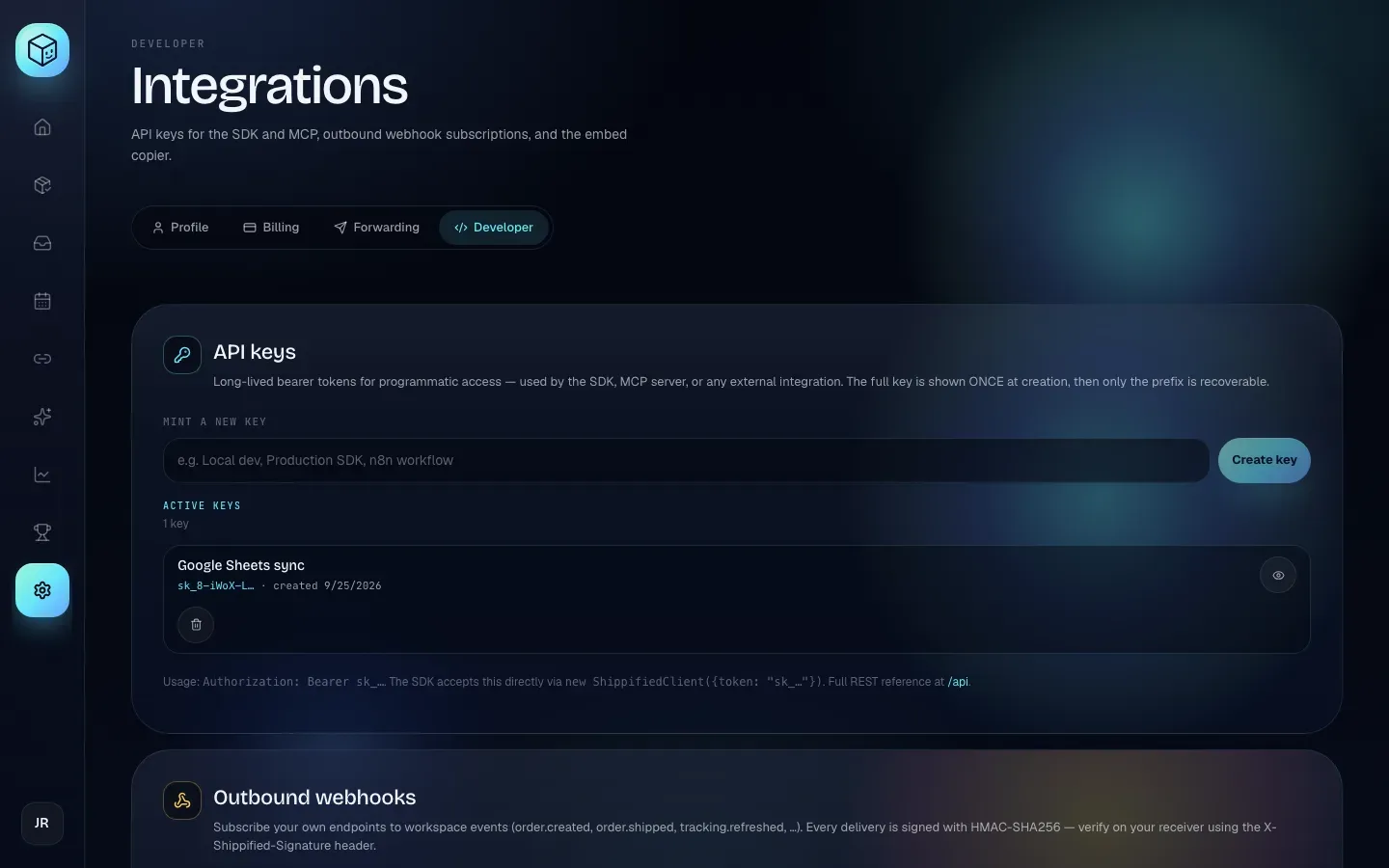
Click Settings in the sidebar, then the Developer tab. The API keys card is at the top.
- Name the key
Under Mint a new key, type a label that says where the key will live, such as
Production SDKorn8n workflow. The label is only for you. If you leave it empty the button stays disabled; through the API an empty name becomesUntitled key. - Create and copy it
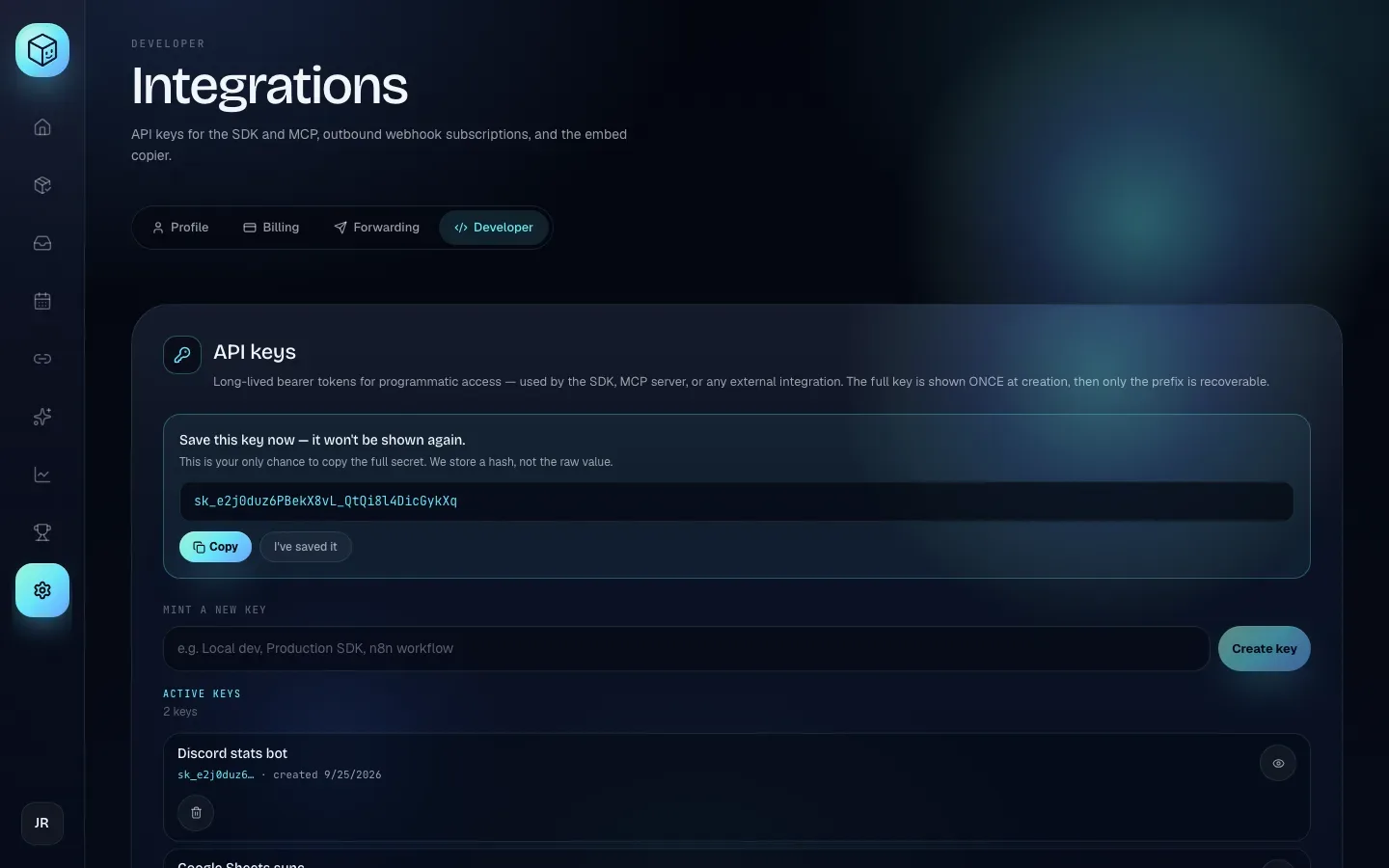
Click Create key. A panel titled "Save this key now — it won't be shown again." shows the full key. Click Copy, paste the key somewhere safe (a password manager or your secrets store), then click I've saved it to hide it.
- Check it's listed
The key now appears under Active keys with its name, its first 11 characters (for example
sk__uMF392z…) and its creation date.
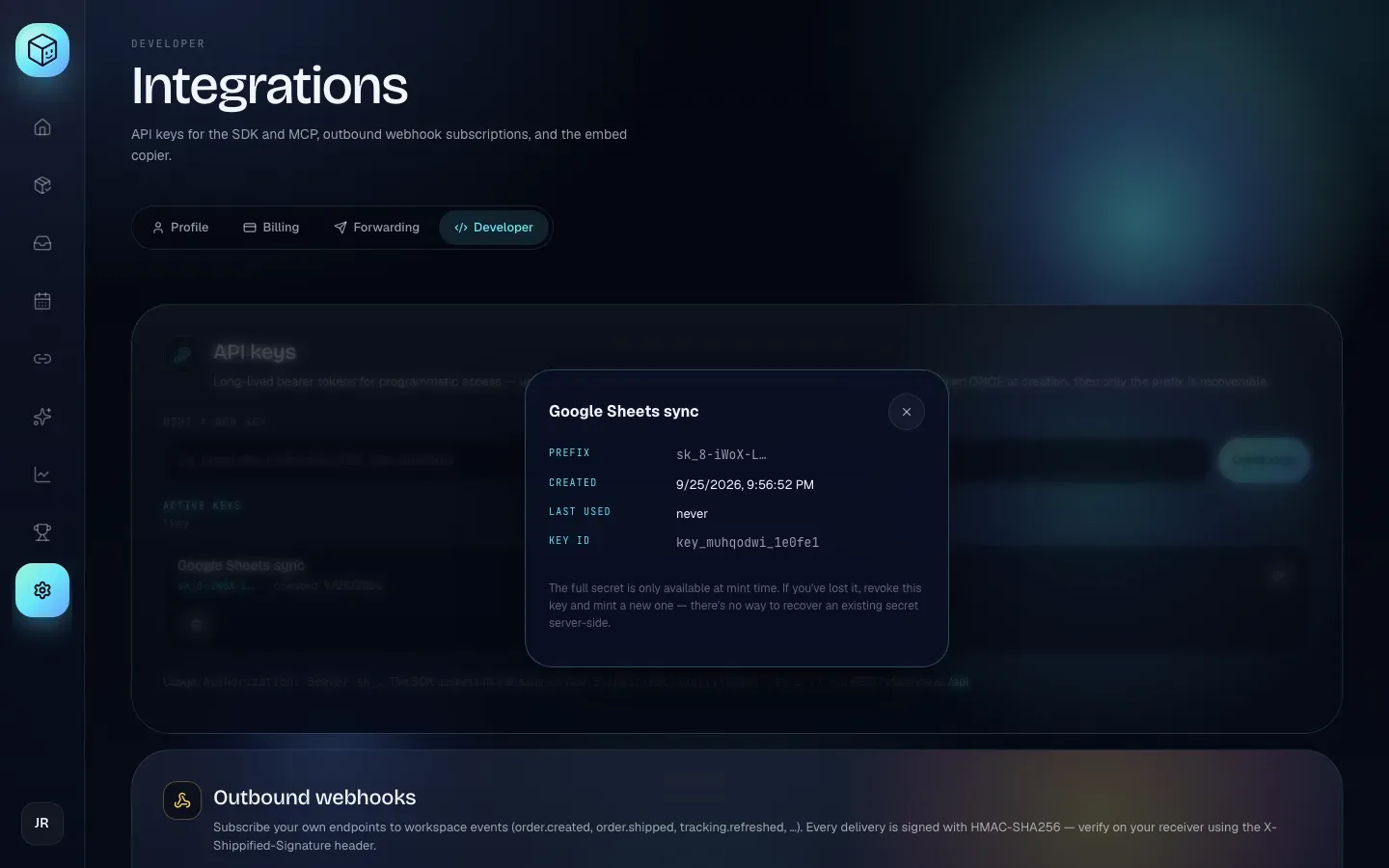
The eye button (Inspect key) shows the key's ID and a reminder that the secret can't be recovered. The bin button (Revoke key) asks "Revoke this API key?" and, once you confirm with Revoke key, the key stops working at once: "Any scripts using it will start getting 401s immediately."
Manage keys through the API
Any valid credential can manage keys, including another API key. Your first key has to come from the dashboard (or a session token).
Create a key
POST /api/account/api-keys
Body field | Type | Required | Notes |
|---|---|---|---|
| string | No | Trimmed and cut to 80 characters. Empty or missing becomes |
- curl
- TypeScript SDK
- MCP
curl -s -X POST https://shippified.net/api/account/api-keys \
  -H "Authorization: Bearer $SHIPPIFIED_API_KEY" \
  -H "Content-Type: application/json" \
  -d '{"name":"Inventory sync"}'
const { key, record } = await shippified.apiKeys.create("Inventory sync");
// `key` is the raw sk_… value. It is never returned again."Create a Shippified API key called Inventory sync." (tool create_api_key, argument name)
Response 201 Created:
{
  "key": "sk_3kq9V0xExampleExampleExample1234",
  "record": {
    "id": "key_m1x2y3z4_a1b2c3",
    "name": "Inventory sync",
    "prefix": "sk_3kq9V0xE",
    "createdAt": "2026-09-24T15:02:11.482Z"
  }
}
Store key right away. The server keeps only a SHA-256 hash of it plus the 11-character prefix.
List keys
GET /api/account/api-keys returns { "items": [ … ] }. Each item has id, name, prefix, createdAt and, once the key has been used, lastUsedAt (updated on every request that authenticates with it). The list isn't paginated: an account can hold at most 25 keys. The hash is never returned.
- curl
- TypeScript SDK
- MCP
curl -s https://shippified.net/api/account/api-keys \
  -H "Authorization: Bearer $SHIPPIFIED_API_KEY"
const { items } = await shippified.apiKeys.list();"List my Shippified API keys." (tool list_api_keys)
Revoke a key
DELETE /api/account/api-keys/:id returns 200 {"ok": true}, or 404 {"error": "API key not found"}. The next request with that key gets 401.
- curl
- TypeScript SDK
- MCP
curl -s -X DELETE https://shippified.net/api/account/api-keys/key_m1x2y3z4_a1b2c3 \
  -H "Authorization: Bearer $SHIPPIFIED_API_KEY"
await shippified.apiKeys.delete("key_m1x2y3z4_a1b2c3");"Revoke the API key key_m1x2y3z4_a1b2c3." (tool revoke_api_key)
Rotate a key
Keys can't be rotated in place. Instead:
Create a new key.
Deploy it everywhere the old one is used.
Watch the old key's
lastUsedAtstop changing, then revoke it.
Limits
Rule | Value |
|---|---|
Keys per account | 25. Creating a 26th returns |
Expiry | None. A key works until revoked. |
Name length | 80 characters |
Session tokens
People sign in to the dashboard through Shippified's sign-in service at auth.shippified.net (email and password, email code, Discord or Google), or with the older Use your password instead form. Each path ends with the server issuing a session token, which the web app keeps in the browser's local storage and sends as a bearer token.
The endpoints that issue sessions are built for the dashboard, not for scripts: they need a human (a sign-in service token, an OAuth consent, or a Cloudflare Turnstile check when the deployment has one configured). Use an API key for programmatic access.
Endpoint | Body | Success |
|---|---|---|
|
|
|
|
|
|
|
|
|
Wrong credentials:
401 {"error": "Invalid email or password"}.Missing or failed Turnstile check:
400with the reason.These endpoints share a rate limit of 10 requests a minute per client IP; over it you get
429withRetry-After: 60.
Sessions expire 14 days after sign-in. To end one early, send it to DELETE /api/auth/session, which deletes the token in the header and always returns 200 {"ok": true}. It doesn't touch API keys.
Check who you are
GET /api/auth/me accepts either token type and returns { user, state }: the account and a full workspace snapshot.
- curl
- TypeScript SDK
- MCP
curl -s https://shippified.net/api/auth/me \
  -H "Authorization: Bearer $SHIPPIFIED_API_KEY" | jq '.user'
const state = await shippified.getState(); // GET /api/state; state.user is the same object
console.log(state.user.webhookHandle);"Show my Shippified account details." (tool get_state)
user contains id, username, email, displayName, createdAt, publicProfile, publicStats, webhookHandle, timezone, plan, subscriptionStatus, subscriptionPeriodEnd, subscriptionPriceId and emailVerified. You need webhookHandle to build Discord intake URLs; see Getting orders in.
Actions that refuse API keys
Two account endpoints accept only a signed-in session. They refuse any sk_… key with 401, so a leaked key can't download everything or destroy the account. In the dashboard they live under Settings → Profile.
Endpoint | What it does | Error with an API key |
|---|---|---|
| Downloads everything the account owns as JSON |
|
| Permanently deletes the account |
|
The export (sent with Content-Disposition: attachment) contains exportedAt, account, settings, orders, emailSources, bots, customTemplates, subscriptions, shares, apiKeys and intakeMessages (the stored emails and webhook posts). Working secrets are left out: no password hash or one-time tokens, no mailbox passwords or OAuth tokens (sources keep only the IMAP host, port, TLS flag and username, or the connected Gmail or Outlook address), no API key hashes, no webhook signing secrets, and Discord webhook URLs are cut to their host.
Deletion needs the account's email typed back:
curl -s -X DELETE https://shippified.net/api/account \
  -H "Authorization: Bearer $SESSION_TOKEN" \
  -H "Content-Type: application/json" \
  -d '{"confirmEmail":"[email protected]"}'
A missing or different confirmEmail (compared after trimming, ignoring case) returns 400 {"error": "Type your account email exactly to confirm deletion."}. On success (200 {"ok": true}) the account and everything it owns are removed, every session and API key stops working, an active Stripe subscription is cancelled, and the sign-in identity is deleted too.
Account deletion is immediate and can't be undone. Export first if you might want your data. See Account and privacy.
Credentials that aren't bearer tokens
Some URLs carry their own credential because the sender can't set headers. Treat each full URL as a secret.
Credential | Used by | Details |
|---|---|---|
Discord intake URL | Monitor bots | The unguessable handle plus the bot's slug. Never add an API key to it. See Getting orders in. |
Forwarding address | Your mail provider's forwarding rule | The random slug routes mail to one email source. |
Embed copier URL | The embed copier Discord bot | Shown and rotated under Settings → Developer → Embed Copier. See the embed copier guide. |
Webhook signing secret | Shippified, when it calls you | Proves a delivery came from Shippified. See Webhooks. |
When authentication fails
Situation | Status | Body |
|---|---|---|
No |
|
|
API key used for export or deletion |
|
|
26th API key |
|
|
A bad key and an expired session get the same 401; the response doesn't say which. A resource owned by another account returns 404, never 403.
My key worked yesterday and now returns 401
Someone revoked it (check Active keys in Settings → Developer), or you're sending a session token that passed its 14-day expiry. Session tokens start without sk_. Create an API key for anything long-running.
I lost the key right after creating it
It can't be recovered: only a hash is stored. Revoke it and create a new one.
Can I give a teammate or tool read-only access?
No. Every key has full access to the workspace. Create a separate key per tool so you can revoke one without breaking the others.
Security checklist
Keep keys in environment variables or a secrets manager. The
sk_prefix makes leaked keys easy to find withgrepor a secret scanner.Use one key per integration, named after it.
Review
lastUsedAtand revoke keys you no longer use.Never put a key in browser or mobile code. The API allows cross-origin calls, but a key in a web page is readable by anyone. Call Shippified from your own backend.