📥Getting orders in
Send orders to Shippified through Discord-format bot URLs, raw email import and email sources, and understand how every message is parsed.
- Written for
- Developers feeding orders into Shippified
- Applies to
- All plans
- Deprecated
- + Deprecated
Shippified builds orders from messages. There are four ways to get them in from code:
Path | Best for | Credential |
|---|---|---|
Checkout monitors, bots, and any script that can post a Discord webhook | The URL itself | |
Pushing single emails from your own mail tooling | API key | |
Letting Shippified read a mailbox (IMAP, Gmail, Microsoft) or receive forwarded mail | API key to manage them | |
Orders you already have as structured data | API key |
The first three feed one intake pipeline. Each message is stored, parsed, and then either merged into the order with the same order number or created as a new order. Storing the message means it can be re-parsed later when your templates improve.
How a message becomes an order
Normalize. A raw email is decoded into From, To, Subject, Date, HTML and plain text. A manual forward (Gmail's "Forwarded message", Apple Mail's "Begin forwarded message:", Outlook's "Original Message") is unwrapped, so
FromandSubjectare the retailer's, not yours. A Discord payload is flattened into text plus a map of its embed fields.Check the sender (email only). If the email source has an
allowedSenderslist, the sender must match it, whichever way the email arrived. For an unwrapped manual forward, the quoted original sender is checked only when the forward came from the account owner's own address (the account email, the source's address, its IMAP username, or the connected Gmail or Microsoft mailbox). A forward from anyone else is checked against the forwarder's address. Refused emails are logged with outcomerejectedand go no further.Skip repeats (email only). A message whose
Message-ID(or, lacking one, content hash) was already ingested is a duplicate and changes nothing.Pick a shape. A shape recognises one kind of message and says which fields to pull out. Candidates are tried in order and the first whose match rules all pass wins:
Discord only: the template pinned on the bot (
templateId), applied without checking its rules.Your custom templates for that channel, newest first.
Built-in shapes for retailer emails and known monitor bots.
An email source with a non-empty
templateIdslist only considers those shapes, in that order. A custom template with no match rules never wins on its own; it only runs when a bot pins it.Extract. The shape's mappings run first; generic patterns then fill anything still missing (order number, item, total, quantity, tracking number, carrier, store).
Drop non-order email. An email that matched no shape is ignored when it isn't from a known retailer domain, has no order number, can't be classified, or has a subject known to be unrelated to purchases. Discord posts and emails you import by hand are never dropped this way.
Merge or create, then fire the matching webhook events. If the workspace has an updates webhook set (Shippified pings webhook in Settings → Forwarding), a status card is also posted there for a new order, or for a merge that changed the order's status or carried an update event, subject to that event type's toggle. Carrier tracking changes post the same card. Mailbox rebuilds and backfills post nothing.
Every email that creates or merges an order, or is refused (blocked sender, plan limit), is written to the intake log (GET /api/webhook-logs, channel email), which is what the dashboard's Inbox shows. Ignored mail and repeats aren't logged.
To make Shippified understand a sender it doesn't recognise, write a custom template: see the custom templates guide and the Templates API.
Discord-format bot URLs
Each bot you create gets its own intake URL. It accepts the same JSON body as Discord's "Execute Webhook" call, so you point a monitor's webhook setting at it instead of a Discord channel, or post to it from your own code.
POST https://shippified.net/api/webhooks/discord/{webhookHandle}/{botSlug}Segment | Where to get it |
|---|---|
| Your account's unguessable handle: |
| The |
The dashboard shows each bot's full URL under Links → Webhooks, with Copy and Send test payload buttons.
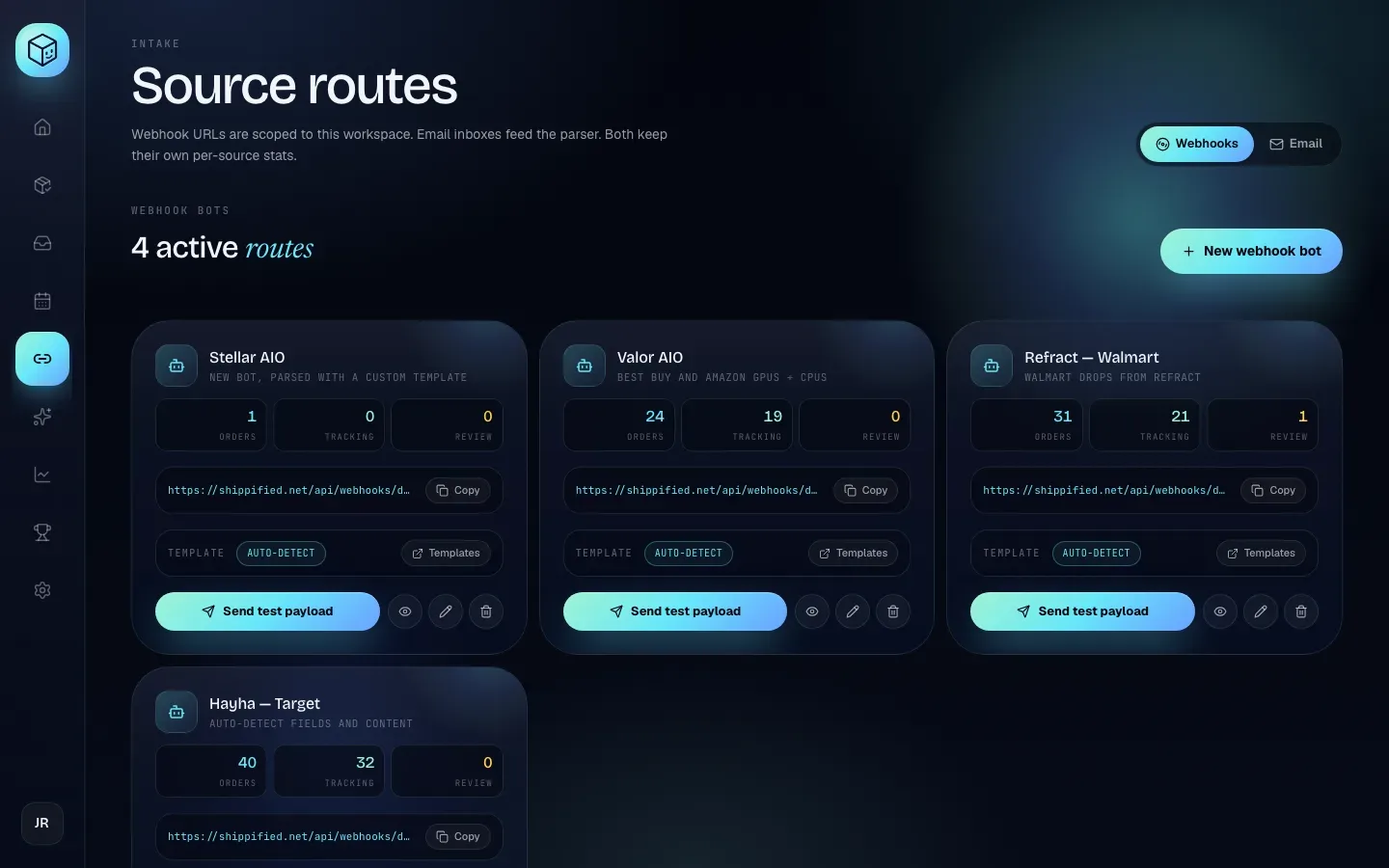
No Authorization header is used: the handle and slug together are the credential.
Anyone with the full URL can create orders in your workspace. Keep it private. If it leaks, change the bot's slug with PATCH /api/bots/:id; the old URL stops working at once.
Query strings such as Discord's ?wait=true are accepted and ignored. Only JSON bodies are read: multipart uploads with payload_json and file attachments aren't parsed.
Payload
These parts of the Discord message are read:
{
  "username": "Acme Monitor",
  "content": "Successful checkout!",
  "embeds": [
    {
      "title": "Successful Checkout",
      "description": "Walmart",
      "url": "https://www.example.com/product/12345",
      "author": { "name": "Acme Monitor" },
      "footer": { "text": "Acme Monitor v2" },
      "thumbnail": { "url": "https://cdn.example.com/p/12345.png" },
      "fields": [
        { "name": "Site", "value": "Walmart" },
        { "name": "Product", "value": "Example Console Bundle" },
        { "name": "Price", "value": "$499.99" },
        { "name": "Order", "value": "||2000123-45678||" },
        { "name": "Qty", "value": "2" }
      ]
    }
  ]
}
Embed
fieldsare matched by name, ignoring case. If several embeds have the same field name, the first wins.Discord formatting in values (
||spoiler||,**bold**,__underline__, backticks) is removed.The first
httpsthumbnail.urlorimage.urlbecomes the order'simageUrl.The whole payload is stored, so template JSONPath selectors can read any field, including ones Discord doesn't define.
Send a checkout
- curl
- TypeScript (fetch)
curl -s -X POST \
  "https://shippified.net/api/webhooks/discord/$SHIPPIFIED_WEBHOOK_HANDLE/acme-monitor" \
  -H "Content-Type: application/json" \
  -d '{
    "username": "Acme Monitor",
    "embeds": [{
      "title": "Successful Checkout",
      "footer": { "text": "Acme Monitor v2" },
      "fields": [
        { "name": "Site", "value": "Walmart" },
        { "name": "Product", "value": "Example Console Bundle" },
        { "name": "Price", "value": "$499.99" },
        { "name": "Order", "value": "2000123-45678" }
      ]
    }]
  }'
// The intake URL takes no API key, so the SDK isn't needed.
const url = `https://shippified.net/api/webhooks/discord/${handle}/acme-monitor`;
const res = await fetch(url, {
method: "POST",
headers: { "content-type": "application/json" },
body: JSON.stringify({
username: "Acme Monitor",
embeds: [{
title: "Successful Checkout",
fields: [
{ name: "Site", value: "Walmart" },
{ name: "Product", value: "Example Console Bundle" },
{ name: "Price", value: "$499.99" },
{ name: "Order", value: "2000123-45678" },
],
}],
}),
});
const body = await res.json(); // 202: { order, merged, forward } or { rejected: true, … }Responses
Situation | Status | Body |
|---|---|---|
Order created or merged |
|
|
Free-plan monthly limit reached |
|
|
Order already in the workspace |
|
|
Post didn't produce an order |
|
|
Unknown handle |
|
|
Unknown bot slug |
|
|
Body over 2 MiB |
|
|
Rate limit |
| See Rate limits. |
order is the full order object after the merge or create.
A plan-limit rejection is a 202, not an error, so Discord and monitors don't retry it. Check the body for rejected: true.
The response is sent as soon as the order is saved. If the bot has an outputWebhook (or the workspace has a fallback one in settings), Shippified then posts a short summary there: up to 3 attempts, 8 seconds each, waiting 1.5 and then 4 seconds between them; 429 and 5xx answers are retried, other 4xx aren't. The result lands in the intake log rather than in the response.
Intake log
Every post that reaches a bot is logged with an outcome:
Outcome | Meaning |
|---|---|
| A new order was created. |
| The post was merged into an existing order. |
| A new order came out with status |
| The plan limit was reached ( |
Read one bot's history with GET /api/bots/:id/logs (newest first, ?limit= 1 to 500, default 200, returns { "logs": [ … ] }), or the whole workspace's with GET /api/webhook-logs (?limit= default 100, max 500). The dashboard shows the same under View bot activity.
Rate limits
Scope | Limit |
|---|---|
Per client IP, all bots together | 60 requests a minute |
Per bot URL | 60 requests a minute |
The per-IP limit is checked before the URL is looked up. Both return 429 with Retry-After: 60.
No deduplication
Discord payloads have no message ID, so identical posts are not deduplicated: two identical checkouts can be two real orders. Posts carrying the same order number still merge into one order.
Manage bots
Method | Path | Purpose |
|---|---|---|
|
| List bots (paginated). |
|
| Get one bot. |
|
| Create a bot. Returns |
|
| Update |
|
| Delete a bot. Orders it created stay. |
|
| This bot's intake log. |
Body fields for POST /api/bots (all optional):
Field | Notes |
|---|---|
| Defaults to |
| Lowercased; anything other than |
| A built-in webhook shape ID (from |
| A Discord webhook URL that gets a short summary of each parsed order. Must be a public |
|
|
| Display and reference fields; they don't affect parsing. |
- curl
- TypeScript SDK
- MCP
curl -s -X POST https://shippified.net/api/bots \
  -H "Authorization: Bearer $SHIPPIFIED_API_KEY" \
  -H "Content-Type: application/json" \
  -d '{"name": "Acme Monitor", "slug": "acme-monitor"}'
const bot = await shippified.bots.create({ name: "Acme Monitor", slug: "acme-monitor" });
const me = await shippified.getState();
const intakeUrl = `https://shippified.net/api/webhooks/discord/${me.user.webhookHandle}/${bot.slug}`;"Create a Shippified bot called Acme Monitor and give me its intake URL." (tools create_bot, then get_state for the handle)
For the dashboard walkthrough, see the Discord monitor bots guide.
Import a raw email
POST /api/email/import parses one email through an email source you choose and creates a real order. Because you picked the message on purpose, it's never dropped as non-order mail: if no shape matches, it still becomes an order (status issue if nothing useful was found). To see how a message would parse without creating anything, use POST /api/templates/custom/detect.
Body field | Type | Required | Notes |
|---|---|---|---|
| string | Yes | One of your email sources. Its template list and sender allow-list apply. |
| string | Yes | The email. Full RFC 822 source (headers and MIME) gives the best results; pasted HTML or text also works. |
| string | No | A fallback sender, used only when |
- curl
- TypeScript SDK
- MCP
jq -n --arg raw "$(cat order-confirmation.eml)" \
  '{emailSourceId: "email_m1x2y3z5", raw: $raw}' |
curl -s -X POST https://shippified.net/api/email/import \
  -H "Authorization: Bearer $SHIPPIFIED_API_KEY" \
  -H "Content-Type: application/json" \
  --data-binary @- | jq '{order: .order.id, merged, duplicate}'
import { readFile } from "node:fs/promises";
const raw = await readFile("order-confirmation.eml", "utf8");
const result = await shippified.emailSources.import({ emailSourceId: "email_m1x2y3z5", raw });
console.log(result.order.id, result.merged, result.duplicate ?? false);"Import this email into my Orders inbox source: …" (tool import_email)
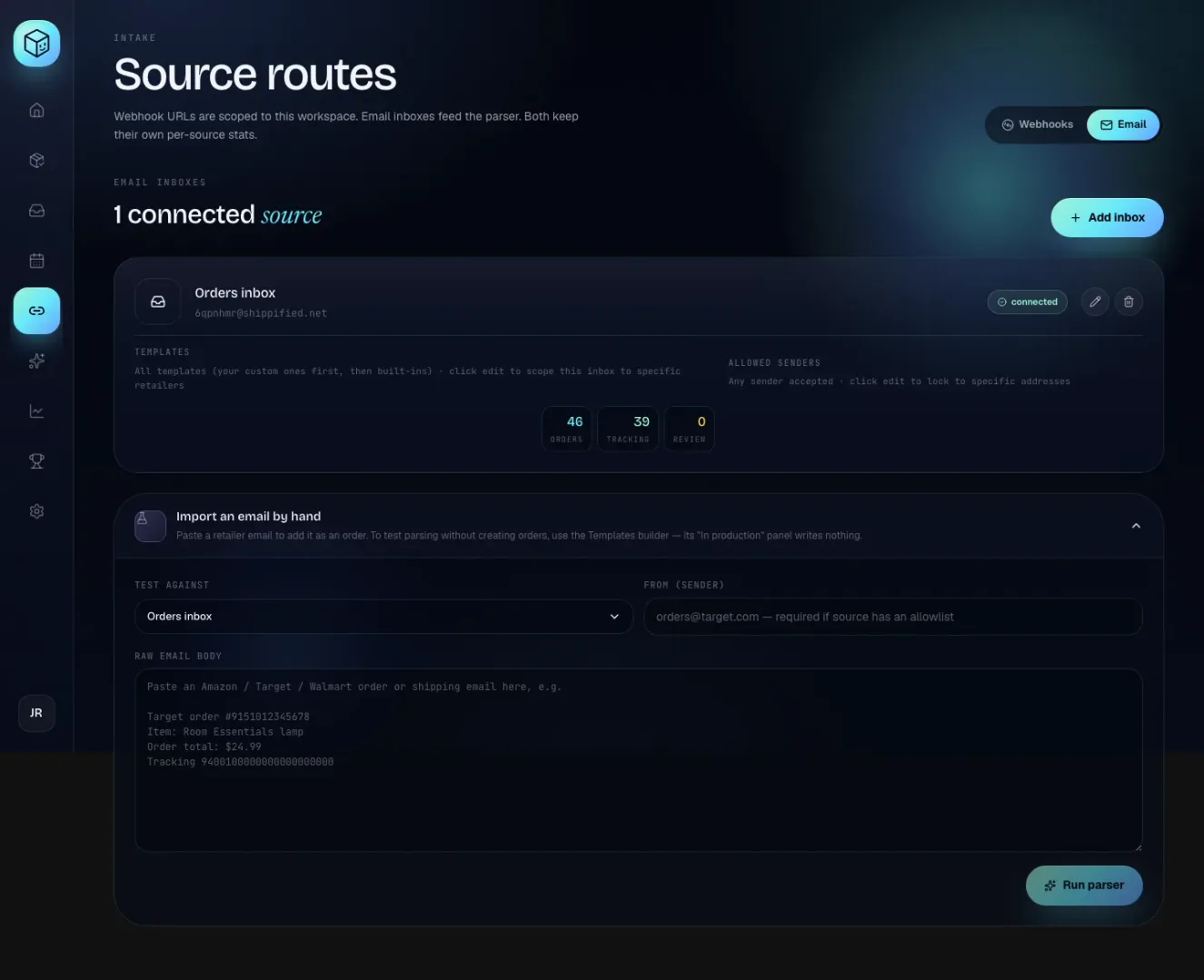
The dashboard's version is Import an email by hand on Links → Email, with a From (sender) field and a Raw email body box.
Responses
Situation | Status | Body |
|---|---|---|
Order created or merged |
| The workspace snapshot (as |
Already imported (same Message-ID) |
| Snapshot plus |
|
|
|
|
|
|
Sender not allowed |
|
|
Source has an allow-list and no sender could be found |
|
|
Couldn't be read as an email order |
|
|
Free-plan monthly limit |
|
|
A successful import response contains the whole workspace snapshot, so it grows with the workspace. Read order, merged and duplicate and ignore the rest.
A successful import posts a status card to the workspace's updates webhook when one is set in settings and that event type is switched on, the same as mail arriving any other way (see How a message becomes an order). Imports, including refused ones, appear in the intake log with channel email.
Allowed senders
Allow-list entries can be:
Entry | Matches |
|---|---|
Exactly that address. | |
| Anyone at |
| Same as |
Comparisons ignore case. An empty list allows any sender. The check applies on every path, not just this endpoint. For a manual forward, it uses the quoted original sender only when the account owner forwarded the email (from the account email, the source's address, its IMAP username or its connected Gmail or Microsoft mailbox); anyone else forwarding in is judged by their own address, since a quoted From: line is just text.
Email sources
An email source is a mailbox Shippified reads, or a forwarding address it receives mail at. For connecting providers step by step (including Gmail and Microsoft sign-in), see Connect email.
Method | Path | Purpose |
|---|---|---|
|
| List sources (paginated). Credentials are never returned. |
|
| Get one source. |
|
| Create a source. |
|
| Update |
|
| Delete a source. |
|
| Check the mailbox now. |
|
| Re-read the mailbox from a past date and rebuild orders. |
Create a source
Body field | Notes |
|---|---|
|
|
| Defaults to |
| Display address. For |
| Shape or template IDs to try, in order. Empty means all. |
| Sender allow-list (see above). |
| Required for |
googleandmicrosoftsources start asneeds_authand becomeconnectedonce the owner finishes the sign-in in the dashboard; the API can't complete that step.forwardingsources get a generated address<slug>@shippified.netinforwardingConfig.inboundAddress(also copied toaddress). Mail forwarded there is ingested automatically.
- curl
- TypeScript SDK
curl -s -X POST https://shippified.net/api/email-sources \
  -H "Authorization: Bearer $SHIPPIFIED_API_KEY" \
  -H "Content-Type: application/json" \
  -d '{"provider": "forwarding", "label": "Orders", "allowedSenders": ["*@target.com"]}'
const source = await shippified.emailSources.create({
provider: "forwarding",
label: "Orders",
allowedSenders: ["*@target.com"],
});
console.log(source.forwardingConfig?.inboundAddress);IMAP errors: 400 {"error": "imapConfig.host is required."}, imapConfig.username is required. and imapConfig.password is required to connect an IMAP source.
Update a source
PATCH /api/email-sources/:id only accepts the fields listed above. status, provider tokens, the forwarding slug and sync cursors are owned by the server. For imap, omit password (or send "") to keep the stored one. Saving imapConfig on a source in auth_failed sets it back to connected and clears lastError, so the next poll tries the new credentials.
Sync fields on a source
Field | Meaning |
|---|---|
|
|
| When the last poll (or, for forwarding, the last message) finished. |
| The last poll's error; cleared by the next success. |
| See Rebuild from mailbox. |
| Forwarding only. |
Poll now
Connected mailboxes are already checked about once a minute. POST /api/email-sources/:id/poll checks right away and waits for the result (the dashboard's Sync now):
{ "ingested": 3, "duplicates": 12, "ignored": 40, "source": { "id": "email_m1x2y3z5", "lastPolledAt": "…" } }ingested counts messages that created or merged an order, duplicates messages already seen, ignored non-order mail. Blocked senders appear in the intake log instead. error is set when the poll failed. A forwarding source returns zeros and "error": "Forwarding sources receive mail via the inbound webhook — there's nothing to poll.".
Rebuild from mailbox
POST /api/email-sources/:id/rebuild with an optional sinceDays (whole number 1 to 365, default 30) re-reads the mailbox and replaces the orders this source produced in that window. Before anything else it refuses, with 400 and nothing changed, a forwarding source or one whose status is needs_auth, auth_failed or paused. Otherwise it answers 202 {"started": true, "since": "<ISO timestamp>"} and runs in the background:
Signs in and checks the mailbox can be read. If not, nothing is deleted and
lastRebuild.errorstarts withCouldn't read the mailbox, so nothing was changed:.Deletes this source's orders received since then that came only from email and have no sale price and no hand-entered values.
Reads every message since that date through the current parser (at most the 5,000 most recent, for IMAP, Gmail and Microsoft alike).
Progress shows on the source: rebuilding: true while it runs, and lastRebuild: { startedAt, finishedAt?, since, removed?, ingested?, duplicates?, ignored?, error? }. A rebuild is a history backfill, so it fires no webhook events or notifications.
- curl
- TypeScript SDK
- MCP
curl -s -X POST https://shippified.net/api/email-sources/email_m1x2y3z5/rebuild \
  -H "Authorization: Bearer $SHIPPIFIED_API_KEY" \
  -H "Content-Type: application/json" \
  -d '{"sinceDays": 90}'
await shippified.emailSources.rebuild("email_m1x2y3z5", { sinceDays: 90 });
const source = await shippified.emailSources.get("email_m1x2y3z5");
console.log(source.rebuilding, source.lastRebuild);"Rebuild my Orders inbox from the last 90 days." (tool rebuild_email_source)
Error | Response |
|---|---|
Forwarding source |
|
Source |
|
Source |
|
|
|
Already running |
|
Rebuilding deletes and re-creates orders. Orders you edited, priced or that also came from Discord or manual entry are kept. To re-run parsing on stored messages without touching the mailbox, use re-parse instead. See the rebuild guide.
Troubleshooting
My bot posts but no order appears
Open View bot activity (or GET /api/bots/:id/logs). A rejected entry with plan_limit_reached means the free plan's monthly limit is used up; not ingested: ignored means the post produced no order, and not ingested: duplicate that the order is already in the workspace. If there's no entry at all, the URL is wrong: check the handle and slug, and look for 404 in the monitor's logs.
Orders arrive as "Unparsed order" with status issue
No shape recognised the post and generic patterns found no item. Write a custom template for the bot, pin it with templateId, and re-parse.
Import returns 403 "is not in this source's allowed senders"
The sender isn't on the source's allow-list. For a manual forward that's the quoted original sender only if the forward came from the account owner's own address; otherwise it's the forwarder. The error's blockedSender shows which address was checked. Add that address or domain, or import through a source without one.
The same checkout created two orders
Discord posts aren't deduplicated. They merge only when both carry the same order number; map orderNumber in your template so later posts merge.